Logo Font Finder from Image
Upload a clean logo crop, wordmark, product label, or brand screenshot to find likely fonts and useful alternatives. This logo font finder reads visible letterforms in the image, so it helps when the original design file or editable text layer is missing. Use the result as a practical shortlist, then verify distinctive letters, spacing, and licensing before using a font in final brand work.
Upload a Logo Font Sample
Drop a logo crop, wordmark, label, or screenshot, or choose an image file
Logo Images That Give a Font Finder Better Evidence
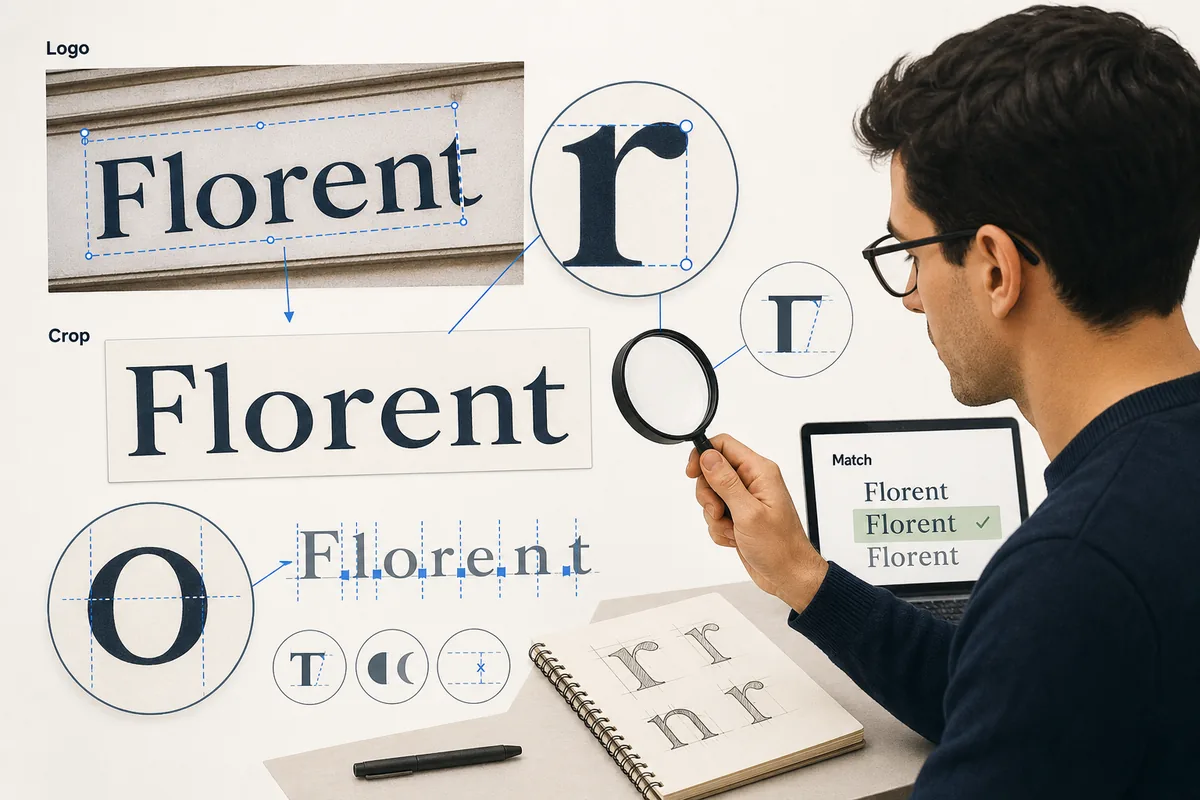
A tight, readable crop lets the detector compare letter skeletons instead of background details. Use one wordmark or one short line whenever possible.
Identify a Font in a Logo Without Guessing from Mood
The tool handles the visual first pass. You decide whether the returned family is exact, a close source, or simply a useful design direction.
Logo lettering is often flattened into a PNG, screenshot, package photo, or social post. That means a browser extension cannot read the original CSS and an editable text layer may no longer exist. Uploading the clearest crop gives the image model the evidence it can actually inspect: repeated letter shapes, terminals, counters, stroke contrast, width, and spacing.
The strongest result is usually a ranked shortlist. A famous wordmark may be custom drawn, modified from a commercial family, or adjusted by hand. Similar fonts still help you rebuild a mockup, compare a rebrand direction, or ask a client the right licensing question.
For a fair comparison, test the same brand word in each candidate at a similar size and weight. Look at distinctive letters before judging the overall feeling. When the result matters commercially, confirm the foundry license and keep the original logo separate from any replacement typeface.
Check these logo details
- Distinctive a, g, e, R, S, ampersands, and numerals
- Stroke terminals, serif shape, and contrast
- Word width, x-height, tracking, and weight
- Whether the lettering looks modified or hand-drawn
What the result cannot prove
Image matching cannot reveal a private font license, hidden source files, or the exact edits made to a custom wordmark. Treat confidence as visual evidence, compare the candidate manually, and avoid calling a result exact when the logo clearly contains bespoke letterforms.
Prepare a logo sample for a more useful match
Start with the highest-resolution version you can legally use. Crop away browser chrome, product photography, and decorative marks so the wordmark occupies most of the frame. A short, horizontal sample with strong contrast is easier to compare than a busy brand board, and a transparent PNG or clean screenshot usually preserves the letter edges best.
After the result appears, compare the primary match and alternatives with the same word, size, and weight. Check unusual terminals, counters, joins, and spacing instead of relying on the overall mood. If the logo is custom lettering, record the closest family as a reconstruction lead, then verify the original artwork and font license before publishing a new brand asset.
The 6-Step Workflow to Find a Font from a Logo
Use this process when the source is a logo screenshot, product photo, packaging label, storefront sign, app icon, or flattened brand mockup.
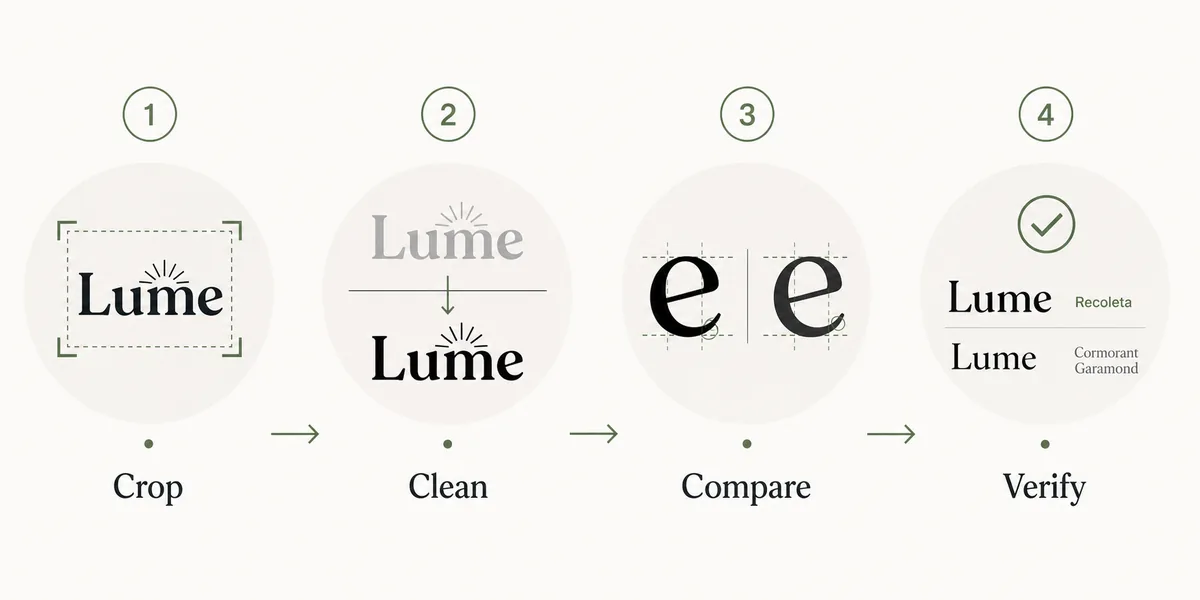
- Start with the cleanest version of the logo. Prefer a flat PNG or screenshot over a tilted photo when possible.
- Crop tightly around the wordmark. Leave a small margin, but remove icons, taglines, backgrounds, borders, and unrelated text.
- Improve contrast without changing the letter shapes. A black-on-white crop usually works better than colored, shadowed, or textured text.
- Upload the crop to Font Detector and save the top matches, similar-font suggestions, and confidence clues instead of trusting only the first name.
- Compare the candidate fonts against the logo using the same word, weight, and approximate spacing. Check distinctive letters before judging the overall mood.
- Decide whether you need an exact commercial font, a free alternative, or a close visual substitute for a design draft.
How to Judge Whether the Logo Font Match Is Good Enough
Logo typography is judged at a larger visual size than body text, so small differences are easier to notice. Use this checklist before you present a match to a client or use it in a redesign.
| Signal | What to check | Why it matters |
|---|---|---|
| Distinctive letters | Compare a, g, e, R, S, ampersands, and numerals. | These shapes reveal whether two fonts share the same skeleton. |
| Width and spacing | Test the exact logo word with similar tracking. | A font can look close in samples but fail when the brand name is set. |
| Stroke behavior | Look for contrast, rounded terminals, ink traps, flares, and serif shape. | Logo fonts often rely on stroke details more than ordinary UI text. |
| Weight range | Check whether the family has the bold, italic, or variable weight you need. | A visual match is less useful if it cannot reproduce the logo's weight. |
| License fit | Confirm whether the font is free, commercial, or only a visual reference. | Identifying a font does not grant usage rights for a brand project. |
What If the Logo Uses Custom Lettering?
Custom logo lettering is common. Designers may start from a font, then redraw terminals, join letters, alter the dot on i, change the crossbar on A, or adjust kerning until the wordmark becomes unique. A detector may still identify the source family, but the live font will not perfectly recreate the logo.
When that happens, separate the decision into three levels. Use exact matches for archival research or brand compliance. Use close commercial matches when a paid font is acceptable. Use free alternatives only when the project needs a practical placeholder or visual direction rather than a brand replacement.
If the logo belongs to another company, avoid recreating it for confusing or infringing uses. Font identification is useful for study, compatibility, and design research, but brand marks may have trademark protection beyond the font license.
Best Tools for Logo Font Identification
No single tool solves every logo. Combine image detection, live website checks, and manual typography comparison.
- Font Detector: Use it first for logo screenshots, product photos, packaging crops, and other image-based wordmarks.
- Browser DevTools: Use it when the logo text is live HTML on a website rather than a flattened image.
- Google Fonts: Use it to find free alternatives after you know the logo's category, width, weight, and letterform traits.
- Adobe Fonts or MyFonts: Use commercial libraries when the logo appears to be based on a premium display, script, or brand typeface.
Common Mistakes When Matching Logo Fonts
Uploading the whole logo lockup
Icons, taglines, badges, and background textures add noise. Crop to one word or one short line whenever possible.
Judging by mood alone
Modern, premium, friendly, and tech are useful brand words, but they are not enough. Verify the skeleton and spacing.
Ignoring modifications
A logo may start from a font but include custom cuts or altered letters. Do not promise an exact font when the visible letters are clearly modified.
Forgetting licensing
A detected font name is not a download permission. Always check the official foundry or library before commercial use.
Frequently Asked Questions
Can I identify a font from a logo image?
Yes. Crop the logo wordmark, improve contrast, upload it to a font detector, and compare the suggested fonts against the original logo. Custom logos may return close matches rather than exact fonts.
What is the best logo font finder workflow?
Use a clean crop, run image detection, compare distinctive letters, test spacing with the exact brand name, and verify licensing before using the font.
Why does the detector show similar fonts instead of the exact logo font?
Many logos are custom-lettered or modified from a base font. The detector can often find the closest family, but hand-drawn changes may prevent an exact match.
Can I use the identified logo font commercially?
Only if the font license allows your intended use. Identification does not include a license, and logo usage may also involve trademark concerns.
Is a free alternative good enough for a logo?
It can be useful for mockups, presentations, and visual direction. For final brand work, confirm whether the project needs the exact commercial font or custom lettering.